New!
Mailvelope Businessfor Nextcloud
Adding E2E email encryption to the most popular on-prem collaboration platform.
Get a quote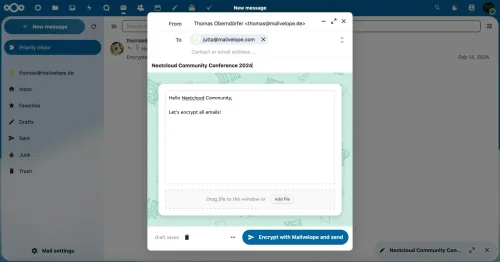
Mailvelope x Nextcloud — the Perfect Match
Secure your email communication by adding Mailvelope to your Nextcloud installation.
Get StartedOur shared values
- Open Source
- Security & Privacy first
- Joy of use
- Sovereign IT on your terms
Your benefits
- Nextcloud Groupware with powerful email
- Mailvelope's advanced encryption features
- Full integration for best user experience
- No data shared outside your organization — even Nextcloud can not read your emails!
Discover Mailvelope for Nextcloud
Some features are not yet fully integrated. They will be made available in the upcoming Nextcloud releases.
Basic Functionality
- Encrypt and decrypt mail
- Sign emails and verify signatures
- Encrypt and decrypt files
Ease of Use
- One-click creation of public and private keys
- Automatically uploads public key
- Automated public key detection of recipient when composing email
Business
- Support for organization-wide keys
Attachment Handling
- Seamless attachment handling in Nextcloud's mail interface
- Supports PGP/MIME (encrypt and sign email with attachments in one structure)
Secure inbox
- Easily detect phishing attempts (signature mismatch)
Backup and Recovery
- Export public and/or private key
- Export keyring
Key management
- WKD protocol for easy and user-friendly key exchange
- Store public keys on Mailvelope Key Server or host it on premise
- Use other key servers like
keys.openpgp.org - Easy import of existing keys
- Support for multiple keyrings
Security Standards
- Neither Nextcloud nor your mail provider can read or decrypt mails (zero trust)
- Neither Nextcloud nor your mail provider can access private keys
- End-to-End (E2E) encryption, happening directly in the user's browser
- Uses PGP (OpenPGP.js or GnuPG)
- Personalized security background to safeguard against attacks
- GDPR compliance
- Highest security standards (list of audits)
How It Works
3 easy steps to enhance your Nextcloud setup with Mailvelope encryption.
If you are using Nextcloud Enterprise, you need to purchase a Mailvelope license. Please, reach out to Nextcloud to get a quote.
- ①Check your Nextcloud subscription or installation to make sure the mail app is enabled.
- ②Download Mailvelope browser add-on and follow the setup instructions.
- ③Encrypt your first email!
Praise for Mailvelope on Nextcloud

"Mailvelope's integration with Nextcloud is a game-changer for secure communication."